Thursday, August 5, 2010

Transferable Research Skills (Part B)

Remote Usability Testing:

Remote testing, is about conducting usability testing without having participants come into the lab. Although there are several tools and web services on the market, I prefer to work with userfeel because of the low cost, and their massive network of testers from all over the globe.

A/B and Multivariate Testing:

A/B and multivariate testing, is about testing different versions of the same design, in order to see which performs the best. I use this technique in all of my usability tests, either by differentiating my designs across one variable (i.e., A/B testing) or more (i.e., multivariate testing).

Co-Discovering Learning:

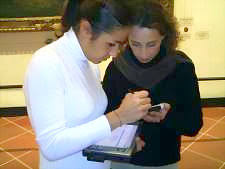
My approach to co-discovering learning, is as follows: I usually ask two or more users to perform a task together, while I observe them. I encourage them to converse and interact with each other to create a “team spirit”. In some cases, I also allow note taking (e.g., when the content is technical/complex). The technique can yield some really powerful results, as it is more natural for users to verbalise their thought during the test.

Participatory Design:

image

Participatory design, is about involving users into the design and decision-making process into an iterative cycle of designing and evaluation. I usually conduct a short participatory design session, prior all of my usability evaluations. In these sessions, the usability issue of a prototype system are determined, and the changes to accommodate for these issues are made. The refined system is then used in the actual usability evaluation.


A4.0 Inspection Methods

Cognitive Walkthrough:

Cognitive Walkthrough

The cognitive walkthrough is a method of “quick and dirty” usability testing requiring a number of expert evaluators. A list of tasks and the actions to complete them is created. The evaluators step  through each task, action by action, noting down problems and difficulties as they go. I can use cognitive walkthroughs on a number of digital interfaces, ranging from web sites to complex authoring toolkits.

Heuristic Evaluation:

Heuristic Evaluation

Heuristic evaluation is about judging the compliance of an interface against a number of recognized usability principles (i.e., the Heuristics). I used this method extensively in the evaluation of e-learning prototypes during my teaching at Middlesex University.


A5.0 Advanced Usability Techniques (in training)

Eye Tracking:

heatmap_lightbox

Eye tracking is a technique that pinpoints where the users look on a system and for how long. I am currently talking with Middlesex University in order to get training on using eye-tracking as a usability testing technique. We plan to conduct a series of eye-tracking session in Middlesex state-of-the-art usability labs, using the MGUIDE prototypes.

Emotion Recognition & Eye Tracking

This is a technique I developed during the MGUIDE project. I discuss it in detail here. It was developed with avatar-based interfaces/presentation systems in mind, but it is universal in nature. It is based on the hypothesis that the perceived accessibility of a system’s content is evident in the user's emotional expressions. The combined “Emotion Recognition and Eye-tracking” technique will be validated in a lab-based study that will be performed at Middlesex University.


A5.0 Audits

Accessibility Audit:

In accessibility audit, an expert checks the compliance of a web site with established guidelines and metrics. The  W3C WAI are the most widely used guidelines in accessibility audits. My approach for accessibility evaluation is framework-based (see here), but a) I haven’t applied my framework with disabled users and b) the W3C WAI heuristics are very well established. Although I have a good knowledge of the W3C WAI heuristics, I have never performed an accessibility audit before.


Enhanced by Zemanta

Wednesday, August 4, 2010

Transferable Research Skills (Part A)

MGUIDE is my most up to date research work, and I am very proud of what I have accomplished. However, I’ve become eager to outgrow the domain and transfer my research skills to the digital media world. I am interested in any form of digital interactive applications (websites, social networks, interactive-tv, search engines, games, etc). I am highly experienced in using the following techniques for user research: 

A: User Research

A1.0 Quantitative Research

Surveys/Questionnaires (Online and Offline):

Post-test and pre-test questionnaires provide real insights into user needs, wants and thoughts. I use powerful statistics (e.g., Cronbach's Alpha) to ensure that the questionnaires I create, are both reliable and valid. I can apply these skills into any domain with minimum adaptation time.

Performance Measures:

Performance measures, like for example, time to complete a task, the number of errors conducted, scores in retention tests, etc,  provide strong indication of how easily people can achieve tasks with a system. If this data are correlated with other objective or subjective measures they can provide deeper user insights than surveys/questionnaires alone.

Log File Analysis:

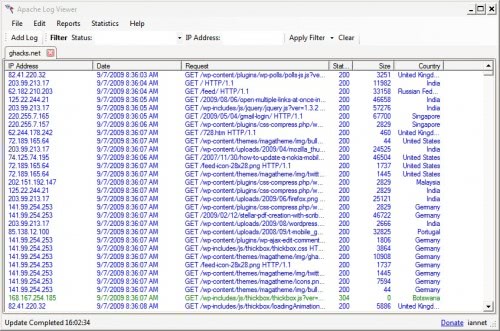
A log is a file that lists actions that have occurred. Both quantitative and qualitative data can be stored in a log file for later analysis. I use device/system logs to automatically collect data such as time to complete a task, items selected on the interface, keys pressed etc.


A2.0 Qualitative Research:

Focus Groups:

I mainly use focus groups for requirements gathering, either through the introduction of new ideas and discussion and/or the evaluation of low-fidelity prototypes. 

Direct Observation:

One of the most common techniques for collecting data in an ethnographic study is direct, first-hand observation of participants. I am experienced in using direct observation for note taking in both indoor and outdoor environments.I find gaining an understanding of users through first-hand observation of their behaviour while they use a digital system, genuinely exciting. During my work in MGUIDE direct observation was used to uncovered a number of interesting user-insights that were then correlated with user views collected from the questionnaires.

User Interviews & Contextual inquiry:

Other common ethnographic techniques are user interviews and contextual Inquiry. I use extensively open-ended interviews  i.e., interviews where the interviewees are all asked the same-open ended questions, in both field and lab conditions. I like the particular style as it is faster and can be more easily analysed and correlated with other data.    

Think Aloud Protocol:

Think-aloud is a technique for gathering data during a usability testing session. It involves participants thinking aloud as they are performing a set of specified tasks. I have used think-aloud very successfully in navigation tasks, where participants had to verbalise their answers to navigation problems as those presented by two interactive systems.


A3.0 Quantitative & Qualitative Research

Usability and Accessibility testing:

usabilitylabs

Lab-based and Field-based testing are the most effective ways of revealing usability and accessibility issues. I am experienced in conducting and managing lab and field testing. I use scenario-based quantitative and qualitative methods for my research.

Continues in the next post

Monday, August 2, 2010

Universality of Research Methods & Techniques

I thought that the universality of methods for research was a fundamental fact of modern science. Isn’t it obvious that having successfully applied quantitative/qualitative research in one domain means that your skills can be applied to any other domain with minimal adaptation time? Is there a real difference between applying qualitative research in a complex avatar-system like MGUIDE and an e-commerce web site? For example, If you apply techniques like unstructured interviews wouldn’t you follow the same principles to design the interviews in both domains?

Or even using more complex techniques like eye tracking  and emotion recognition, aren’t these domain-independent? Consider for instance, my combined emotion recognition + face detection technique for accessibility research, described in the previous post. The technique was developed with avatar-based interfaces/presentation systems in mind. Adapting the technique to different domains is a matter of defining the aspects of the interface you wish to research. The quantitative data that you will collect are the same (emotion intensities, etc), the qualitative of course will differ because the interfaces are different. In general once you establish the objectives/goals of the research, deciding which  techniques you will use (and modifying them if necessary  to suit your needs) is easy and the process is domain-independent.

2516939380_79f2e5dcf6 eyetracking-study-heat-map

Eye tracking used in completely different contexts: a) a 3D avatar-based world and b) a web page.

I am not sure why some people insist otherwise and focus so much on the subject matter. I have to agree that having expertise in a certain area, means that you can produce results fairly quickly. However this is a process easily learnt. Is domain expertise the most important quality a user researcher should have? Or should he perhaps have a solid research skills-set to start from and the willingness to learn more about established techniques and explore new ones?

Saturday, July 31, 2010

Video Games & Online Games

This post in an attempt to disambiguate the domain of virtual humans. Most people have never heard the term “Virtual Human” before, but they all play games (online or offline) and they all have interacted with some limited form of a VH on the web.

Computer games (online and offline) are the closest thing to the domain of Virtual humans.

Online games (e-gaming)

You can argue that online games are much simpler than video games, but they are progressively getting much more complicated. As in video games, fully-fleshed avatars are widely used to immerse the player into the scenario. Below is an example of a poker game I found from a company called PKR. Notice the use of body language, face expressions, etc to create a fully realistic poker simulation.  

Video Games:

Below is a screenshot from my favourite game Mass Effect:

ME2%20choices Source: http://www.jpbrown.co.uk/reviews.html 

Notice the use of dialogue wheels to simulate dialogues between the avatars. There is an excellent analysis of the particular style of conversation here: 

However, in contrast to most current video games Virtual humans engage players in actual dialogue, using speech recognition, dialogue system technology, and emotional modelling to deepen the experience and make it more entertaining. Such technologies have started only recently to find their way into video games. Tom Clansy’s End War game is using speech recognition to allow users to give commands to their armies.

endwar-beta-02 Source: http://www.the-chiz.com/

Some games go as far as using full natural language processing:

Virtual Humans on the Web:

There are a lot of very superficial virtual humans on the web. This is perhaps one of the main reasons that they have failed so far to become a mainstream interface. What virtual humans should be, is about the whole thing: emotion modelling, cognition speech, dialogue, domain strategies and knowledge, gestures etc. Avatars like Anna of IKEA are mere drawings with very limited dialogue abilities, and are simply there to create a more interesting FAQ (Frequently Asked Question) Section. There is still someway to go before we will see full-scaled avatars on the web, but we will get there.


2  Source: http://www.ikeafans.com/forums/swaps-exchanges/1178-malm-bed-help.html


Friday, July 30, 2010

E-Learning Prototype

Below is the prototype of a e-learning system that I was asked to do by a company. As I can not draw, I decided to use Microsoft Word to communicate my ideas. There should be a good storyboarding tool out there that could help me to streamline the process.

The design below is based on existing and proven technologies that can be easily integrated into existing e-learning platforms. Codebaby, a company in Canada is already using avatars (such as those shown in my design) [1] in e-learning very successfully for several years. The picture in the last screen of the design is a virtual classroom [2] created in the popular Second Life platform.

 
Compare my solution with a “conventional” e-learning platform shown below. Although I do include several GUI (Graphical User Interface) elements in my work, it is obvious that : a) my interface is minimalistic with fewer elements on the screen. b) accessibility is greater, as instead of clicking on multiple links in order to accomplish tasks, you can simply “ask” the system using the most natural method you know - “natural language”. The benefits of avatar-assisted e-learning will become evident when the web progresses from its current form to Web 2.0 and ultimately to Web 3.0. For now, such solutions should at least be offered as an augmentation to “conventional” GUI-based interfaces. All companies want something more, for example something that would add easier access to module contents and  the “WOW” factor to their products. They just don’t know what it is until you show it to them.
 
1[2]
 
Although the proposed design is based on mature and well-tested technologies, I can understand if someone wants the purely GUI solutions. In fact, I would be more than happy to assist them. I have been working with GUI interfaces for several years, long before I developed an interest for avatar technologies. I developed my first e-learning tool back in 1998 (12 years ago). It was an educational CD-ROM about the robotic telescope platform of Bradford University.
 

[1] http://www.codebaby.com/showcase/

[2] http://horizonproject.wikispaces.com/Virtual+Worlds

Heuristics vs. User Research

People keep asking me about the W3C accessibility guidelines – a set of heuristics that should aid designers towards more accessible web sites. Of course these are not the only guidelines out there, BBC has it own accessibility guidelines and  there are several for web usability as well. Although I am familiar with the W3C guidelines, I didn’t use them in my MGUIDE work because I didn’t find them relevant. The reason is that the W3C guidelines are written specifically for web content and not for multimodal content. The research is the area of virtual humans provide more relevant heuristics, but there is still room for massive additions and improvements. Instead of heuristic evaluation, I decided to built my own theoretical framework to guide my research efforts. The framework is based on the relevant literature in the area and on well documented theories of human cognition. It provides all the necessary tools for iterative user testing and design refinement. 

There is no doubt that relying on user testing is costly and lengthy. This becomes even more difficult, when you have to deal with large groups of people as I did in MGUIDE. However the cost and time can be minimised with the use of proper tools. For example, the global lab project has created a virtual lab (on the popular Second Life platform) in which projects are accessible to anybody, anytime, and from anywhere. New research methods like eye tracking and emotion recognition, can reveal user insights with a relatively small group of people and with minimal effort. Soon enough perhaps, tools will include routines that calculate deep statistics with minimal intervention. User testing has definitely some way to go before it becomes mainstream, but I am sure we will get there.

Until then, Inspection methods (e.g., cognitive walkthroughs, expert surveys of the design, heuristic evaluations etc) are used to replace user testing. In such a process, some high level requirements are usually prototyped, and then judged by the expert against some established guidelines. A major problem with this approach though, is that there are over 1,000 documented design guidelines [1]. How do you choose which is one is proper given the specific context? It is my understanding that each institute/professional uses a set of best-practice guidelines, adapted from the relevant literature and from years of experience. However, even if these guidelines have worked in the past it doesn’t mean they will work again. Technology is progressing extremely fast, and people become more knowledgeable, and more accustomed to technology every single second. Therefore, even when inspection methods are used some form of user testing is necessary. A focus group for example, with a couple of users can provide enough user-insights to amend a design as necessary.

[1]http://www.nngroup.com/events/tutorials/usability.html 


Wednesday, July 28, 2010

Emotion Recognition for Accessibility Research

There are a number of quantitative techniques that can be used in the user research of avatar-based interfaces. Apart from the “usual” techniques for gathering subjective impressions (through questionnaires, tests, etc) and performance data, I also considered a more objective technique based on emotion recognition. In particular, I thought of evaluating the accessibility of the content presented by my systems through the use of emotion expression recognition. The main hypothesis is that the perceived accessibility of the systems' content is evident in the user's emotional expressions. 

If you think about it for a while, the human face is the strongest indicator of our cognitive state and hence, how we perceive a stimuli (information content, image, etc). Emotion measures (both quantitative and qualitative) can provide data that can augment any traditional technique for accessibility evaluation (e.g., questionnaires, retention tests, etc). For example, with careful logging you can see which part of your content is more confusing, which part requires the users to think more intensively, etc. In addition to the qualitative data, the numeric intensities can be used for some very interesting statistical comparisons.  Manual coding of the video streams is no longer necessary, as there are a number of tools that allow automating analysis of face expressions. To my knowledge the following tools are currently fully functional:

1) Visual Recognition

ScreenShot (1)

2)   SHORE

Mimikanalyse

The idea is fully developed, and I am planning the release of the paper very soon. Finally, If we combine this technique with eye-tracking we can reveal even more user-insights about avatar-based interfaces. We could try for instance to identify, what aspect of the interface make the user to have the particular face expression (positive or negative). For example, one of the participants in my experiments mentioned that she couldn’t pay attention to the information provided by the system, because she was looking at the guide’s hair waving. To such a stimuli humans usually have a calm expression. This comment is just an indication of the user-insights that can be revealed, if these techniques are successfully combined.